Your No.1 Favorite Informative Blog. Get The Latest World Breaking News, Entertainment News, Sports News And Lots More.....
Whatsapp Messenger is now the
best smartphone mobile messaging application that we have seen till
now.It has got unique and truly unbelievable features which has priced
at $ 22 Billion.We all know that Facebook CEO Mark Zuckerberg has
recently made the deal to purchase and Acquire Whatsapp or $22 Billion
which was confirmed in the month of September,2014.We can expect how
huge can be value of Whatsapp messaging app as it is priced so
high.Every month more than 400 active users are seen on Whatsapp which
is very close and near top beat the record of Facebook.The
main reason why most of the people are attracted to it as because it
gives you fast blazing messaging service which is truly awesome.It also
has some other features which are good to see and use as well.
It has got a Better UI design which
can be understood by any new users and User interface is quite
predictable than other messaging applications.SO I am going to share
some of the most beautiful tricks and Tips for Whatsapp messenger.I will
be teaching you some of the best Tips and Tricks like how to hide your
last seen,Then Hide your Status and Profile picture easily.Use whats app
for life long and then more good tips and tricks.So, 'let's get started
and get unknown to the best tips you can learn for Whatsapp.
Must See : Best Whatsapp DP Images And Status
Whatsapp has become of the largest used messaging application and it has
been released for different operating systems too.It is released for
all versions of Android, IOS ( Iphone and Ipad) , BlackBerry, Windows
Phone,Symbian, Nokia and Java.It provides you the ultimate features of
sending message to anyone unlimited and there are not restrictions.You
can send files, Video and Pictures also.
Best Unknown Whatsapp Tricks and Tips 2014
I will be showing you some of the most asked and unpredictable Whatsapp
tricks you can ever imagine.You can simply make use of these simple
Whatsapp tricks and Tips if you follow my whole guide of Tricks and
Tips.
1.How to Use Whatsapp without Using any Mobile Number
Here is the best ever Whatsapp trick
you can know.Using this trick you can install Whatsapp without having a
mobile number.This trick is really awesome as it requires no SIM Card
at all or usage of mobile number for registration.
- Firstly Un Install Whatsapp and Then Re Install it
- During the time of Verification it will ask to verify your mobile number
- Then put your mobile device on flight mode to block all out going messages easily
- Make sure you have installed Spoof for Android firstly
- Now you have to chose an
alternative method to verify Whatsapp.Then , check " Verification
through SMS" and give them your email details and click on send
- Instantly without waiting for any more time, you have to click on cancel and the whole process will be terminated
- Now open the fake messaging application " Spoof' and use the below details likely
To: +447900347295
From: +(Country code)(mobile number)
Message: Your email address
- Your Spoof app will get the
verification code now and happily you can use it to verify your Whatsapp
account without mobile number
2. How to Hide your Mobile Number in Whatsapp Groups
We all do Group chatting and most of
the times we come known to unknown people during chats and messages in
groups.There is an little awesome trick which can help you to hide your
phone number on Whatsapp account during Group chats.
- First Un Install and Then Re-Install Whatsapp on your Mobile phone
- At the time of Verification of Mobile number you have to keep your mobile on Flight mode
- Now click on " Verify through SMS' and then after enter your Email ID, then click on send button
- In a second click on Cancel which will terminate the whole process
- click here to Download Spoof Text Messages to spoof your message
- Then go to the outbox and copy all the details of spoof application and then send it spoofed verification
- You can use below details
To: +447900347295
From: +(Country code)(mobile number)
Message: Enter you email id
Sometimes later the messages will be
sent to that spoofed number and it will appear to all in Group chats
than to use your Original number.
Must See: Download Whatsapp For Nokia ASHA
3.Password Lock For Whatsapp * - Best Lock Trick for Whatsapp Account
We all know how important any
account is.so we need to play safe with our accounts.I will be showing
you how you can add Password security to your Whatsapp account.SO, that
it is safe and no one other can track in or use it unwillingly.
You can use Smartphone security/lock apps to secure your Whatsapp but the best one i would suggest it to use Whatsapp Lock.
- You Can Download Whatsapp Lock application from this download link
- Then Install it on your Smartphone and add a Password to secure your Whatsapp account from everyone
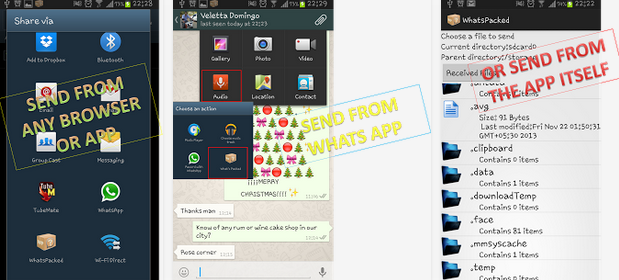
4.Attach and Send PDF, APK and Zip File Extension Via Whatsapp
Whatsapp does not allow you to send
other file attachments.SO, you won't be allowed to send PDF,APK and Zip
file extensions Via Whatsapp messenger.I will be showing you how you can
send PDF,APK files through Whatsapp.
- Download and Install ' Whats Packed 2 ads" application
- Then you will be able to send any PDF, APK or Zip file to anyone in your Contacts
- Receiver also need to install this application
5. Run Multiple Whatsapp Accounts On Android ( More than one Whatsapp account on single Android device)
We all know that Whatsapp only
supports a single number through one Android smartphone.We cannot add or
have multiple Whatsapp account running on one Android device. Now do
you want to know how you can easily add multiple accounts to your
Android device.We will be using Switch Me app on your Android device to
control one or more Whatsapp account on single Android smartphone and
Tablet.
- You have to download and Install SwitchMe app on your Android device firstly
- After that add one or more accounts using this simple app
- Switch Me application allows you to handle more than one Whatsapp account, data and storage.
6. Extend Whatsapp Trial Period - Get More free Trail Period even when its over
We all know that Whatsapp ask for
$0.99 after one year of usage and its compulsory.SO, we either have to
buy the package for one more year or let our Whatsapp accounts rust to
dust.Using this short and simple trick you can extend the free trail
period of your Whatsapp for one more year.This trick is really simple
and finely working.You can get on more year extended free trial
period.You don't have to pay any single penny for this purpose.
When your free trial period is going to be completed, then finally
delete your Whatsapp account.After that you have to create a new
account.The whole process will be done in 5 minutes or less but you will
be getting one more year of Whatsapp free account.
- How to Delete your Whatsapp Account
- Go to Settings and click on Account
- Then click on " Delete my Account" option
After that create anew account using
the same name and details and you will see the free trial being
extended.You can save your data first and re upload it for the new
account.
7. Best * Recover Deleted Whatsapp Conversations - Recover Deleted Messages and Chats
Sometimes you might delete your
Whatsapp messages or conversations.Accidental deleting messages would go
so wrong as messages might be very of interest and value.You need to
know that Whatsapp always backups the messages and stores them in your
memory.Then this trick is for you to get back all your messages easily.
Trick
- Uninstall Whatsapp and Then Re-install it after sometimes
- It will ask to restore all your history , Data and messages and click OK for it
- Now after Re installing you can see all your messages are back there
8. Download Whatsapp For PC and Laptop
We all know that Whatsapp is not
released for Desktop versions of Windows.So, it has not been released
for Windows desktop like Windows 8,7 and XP.So, using this trick you can
Download and install Whatsapp for PC Laptop [Direct Link].You need to download Bluestacks for this purpose and then follow the below guide.
- Firstly Download Bluestacks Offline Installer For PC
- Then search for ''Whatsapp" app in search bar
- Download and Install the app on your PC/Laptop
- Now configure using your Mobile number and start using Whatsapp on your Windows PC or Laptop.
9. Create Shortcuts for Important Contacts
Do you want to keep some of your
important contacts separate on Whatsapp.But you don' have nay option to
separate your contacts from the important ones.Using this short trick
you can easily create a group for contacts.You just have to long press
on contacts to create a separate group.
Then a small pop up will appear
asking you to create a shortcut for conversations.Follow it and create a
group of contacts easily.
For IOS
This trick is not there for IOS version.You have to download and Install a third party application named click here for 1 TapWa
,Use it for creating a separate group of contacts.
10. Stop Auto Downloading Images and Videos Trick * - Best Whatsapp trick ever
Whatsapp has default feature which
automatically downloads media files like audio, Pictures and Videos
which is really bad for storage space.This feature may decrease space on
both the Internal and External storage.It will also kill your battery
life.To block or stop auto downloading feature you can use this simple
trick.
- Go to your Whatsapp Account and Click on Settings
- Then click on Chat Settings and Media auto Download
- Change the settings accordingly , see in above image.
11.Best Whatsapp Trick to Hide the Sent Image using Another Image
Do you want to hid the images you
have sent to your friends during any conversation.Then you can easily do
it suing our fast and simple method of changing the image with other
image.
click here for Magiapp TRICKS
apps for Android devices and click here for Thumb
app for your IOS device allows you to hide any of your sent image with other image easily.
When you use this application, the original image will be replaced with
others.SO, when ever someone click on that image they can see the
original picture then only.This trick is not allowed for Blackberry or Windows
Phone.
12. Whatsapp Statics -Get All your Whatsapp Statics and Data
Whatsapp has become a way of time
passing and you would be spending a lot of time chatting with your
friends.So do you want to know how much time you spend on Whatsapp
daily.You can get all the statics information related to your account
like messages sent, received,Data sent easily.I will be showing you how
you can do this very easily and get your Whatsapp Data.
Go to Settings and Click on Usage
here you can find all the details on your usage of Whatsapp easily
Second Method
If your not satisfied with it, then you can use click here for Whatstat App which gives all your Whatsapp account detail more precisely.All the details are sent in colored graph form.
13. Hide your Whatsapp Profile Picture - Awesome Whatsapp Trick
To Hide your profile picture, feature is available in the latest version
of Android.So, you cannot do this in the older versions of Whatsapp.You
can download the Latest Whatsapp version from here.
Using this trick you can hid your
profile picture and make it invisible for others to view.This is apart
of latest Whatsapp security and privacy settings.
- Then go to Settings and click on Account Privacy and select the best privacy option you like
14. How to Stop Whatsapp Images to Appear in Photo Album
All the Pictures, Videos sent on
your Whatsapp account by different people like your Friends and Family
directly appear in your Photo Album in Whatsapp folder.It is the same
with all different photo album applications for Android and IOS
merely.So, it get's little confusing when you use your Photo Album and
get confused with all the images at one place.
Using this trick you can stop Whatsapp images being appeared on your Gallery.
For Android Users
- You need to have a file manager application
- I will select ES File Explorer which is really good , Install it on your Android device
- Then go to Whatsapp folder and create file named .nomedia file
- So as to do this you have to Tap New button in the lower left, choose File and create a file with name .nomedia
- Now your Whatsapp Images and Videos won't appear in Gallery or Photo Album
For IOS users
- You have to go to Settings option
- Then click on Privacy settings and enter it
- Select Photos under it and uncheck the Whatsapp images option
- Now your Whatsapp images won't be shown in Photo Album on IOS devices
15. Create Fake Conversations and Messages on Whatsapp - Easy and Amazing Whatsapp Trick
Have you ever thought of creating
fake conversations and messages to prank any of your friends.Yes, you
can easily create Fake messages or Chat on your Whatsapp between any two
people.We will be using Whatsaid app for this purpose.
- To Download Whatsaid App Click here
- Install it and start making pranks with your friends
16. Trick to Share File of Size More Than 16 MB ON Whatsapp
We all know that Whatsapp does not allow us to share any file which is
more than 16 megabytes.We can easily send Images and Audio files who's
size doesn't really matter because most of them are less than 16
MB.While we talk about Videos are to have a size of more than 16 MB
sometimes.
You can easily send Videos of size more than 16 MB using Whatsapp.Don't believe then try this simple trick.
- You have to compress your Video for this process
- We will be using Video Whatsapp Converter for this
- Using it , you can compress the Video file size to mcuh less than 16 MB
17. Trick to Configure Whatsapp Without SIM Card
Whatsapp requires configuration with a SIM Card on any mobile or
Smartphone.So, we cannot install Whatsapp without a proper SIM Card
inserted in the device.So, do you want to know how you can easily get
rid of this feature.Follow my simple guide and you can install Whatsapp
on any Mobile or Smartphone without SIM Card.
- You should have to Mobile phones for this Trick firstly
- One to verify Whatsapp service and Other mobile top install Whatsapp on it
- Make sure that SIM Card is not registered with any Whatsapp account
- Download and Start Installing Whatsapp on mobile ( Wihtout SIM)
- Next you have to verify SIM number using pin, enter the Mobile number on second mobile ( SIM Card)
- You will receive verification code on second mobile ( With SIM Card)
- Now enter the verification code on first device and start using it happily
18. Trick to Migrate Whatsapp Messages from One Phone to Other
When ever you change your Mobile from one to other you also have to
transfer all your messages from one mobile to another which is not known
to all.So to migrate Messages from old phone to the new phone you have
to follow this simple guide of mine.
- Before you install Whatsapp on the new phone
- You have to go to File Manger > Whatsapp Folder
- Click on Database on old phone and save to your PC
- Now install Whatsapp on New phone and copy the Database from PC to new phone
19. Change the Phone Number Of A Whatsapp Account
DO you want to know how you can
change the Phone Number that is linked with a Whatsapp account.So, you
have to uninstall and re-install Whatsapp on the same phone with a new
SIM card at the end.
Also there is an option on Whatsapp which allows you to change the phone number linked to a phone number.
Go to Settings > Account > Change Number
Now you can easily change the mobile number.
20.Hide Last Seen in Whatsapp
Whatsapp last seen feature in
Whatsapp tell you when your friend has seen the conservation or not.It
gives you the time when your friend has seen your previous or last
chat.This is really good feature but sometimes it gets tricky when you
don't want to let others know that you have seen their chats.Or
sometimes you don't want to talk with anyone.Its better to be safe by
closing this feature.Previously we used to download many " Third Part
Apps" from Google Playstore in order to stop the last seen feature in
Whatsapp.But now you don't have to use ANY more 3rd party apps as you
get an amazing feature setting to change your Last seen.This setting is
available in the latest Whatsapp version where you can instruct Whatsapp
to change the privacy of last seen feature.
Follow this short guide on " How to hide last seen in Whatsapp"
- Open your Whatsapp Messenger first
- then go to Settings section and click on Account
- Next head towards Privacy and click on Last Seen
- Next select Last seen for " Everyone , My Contacts or Nobody"
21.Change Whatsapp Theme - Kick your old Whatsapp Theme
In Whatsapp you might be able to
change your DP, Background and Status but you cannot change old Theme
of Whatsapp.So, you can change your old Whatsapp theme into anew one
using click here for Whatsapp Theme Holo application
.
Whatsapp Theme Holo provides you some of the best Whatsapp themes,
colors and much more to decorate your Theme and custom,size it
better.There a dozens of themes provided including the default theme.
Download Whatsapp Holo From here
Please feel free to express your views on this Guide we would be glad to hear from you.

Adsense as you know is one of the best and trusted method to monetize
a blog. But Adsense is not like other ad programs which give easy
approval, there are some minimum standards which should be met by blogs
before applying for Adsense. Many people in a hurry apply for Adsense
without knowing the inner details of it they think writing content is
just enough for Adsense approval. Some years back say 5-8 years from now
Google used to approve almost all the blogs which applied for Adsense
even if it has 10 articles written, but due to high volume of
applications, fraud clicks Google changed the complete procedure for
Adsense. As you know Adsense provides the most relevant and high paying
ads one day or the other every blogger tries to apply for it, yes you
need to apply but before applying you should follow some tips. These
tips cannot be ignored at any point all these are checked thoroughly by
Google before considering your blog eligible for Adsense.
Why did Google made Adsense application rules stringent.
Google takes it’s advertising business very seriously and they do
not want their trusted users pay money for illegitimate clicks, At the
starting of Adsense there were very few bloggers but as the time passed
blogs have increased exponentially and fraud clicks and self clicking of
ads also increased, this made advertisers to pay advertising amount
without any profit and millions of dollars were going in vein, hence
Google came up with strict rules before considering a blog for Adsense.
Let us see some tips before applying for Adsense.
6 Tips To Get Adsense Approval | Adsense Approval Guide

Tips For Adsense Approval
# It’s Time To Invest.
You know
www.blogger.com and
wordpress.com
give free blogging service and we can create free and unlimited blogs
without spending a penny longs back Google used to approve blogs such as
www.abc.blogspot.com or
www.abc.wordpress.com but time has changed you need to have your custom domain and not
www.abc.xyz.com, to get a custom domain you need to invest some amount, you can create a new domain or upgrade your existing one.
# Being Professional
Blogging is not only for money but it’s about sharing knowledge. If
you are starting a blog think about long term plans for example if you
have interest on health and fitness then it is better to write on health
topics rather than writing on technology, when you write in the area
you specialize then you have lot of room to grow and when you write on
topics which you do not have enough knowledge you will stop at some
point. When you write on your area of interest you do not require to
work hard all you need is to explain the concept in an easier way. Also
remember Google does not approve sites related to adult content and Gambling content.
# Choosing Design.
Google wants blogs to be as simple as possible and users should
not have a problem while navigating, so choose a theme or design for
your blog which loads quickly and has simple colors. If you have awesome
content but your blogs design is messy and has flashy colors then
definitely users will immediately close your blog. Always think from
users perspective after choosing a design ask your friends and family
members about it as each and everyone has their opinions take their
feedback as constructive and make changes as required.
# Motto Of Blogging.
Have you seen professional blogs they have a pages called About Us
and Privacy Policy pages. These pages ensure the purpose of your blog
and how you care for your viewers, if you do not have these pages on
your blog then you cannot get approval for Adsense. Write some good
description of your blog and purpose of it in About Us page and create a
Privacy Policy page and explain how your blog works you can get get
sample privacy policy page from Google search.
# Get Some Viewers.
There is no hard and fast rule about how much traffic a blog should
have for Adsense approval but it is always good to have some visitors,
after writing some good articles start sharing it on social media sites
such as Google+ and Facebook let your friends and family know about your
blog ask them to share the blog and posts this give some exposure to
your blog.
# Be Patient.
If you are applying for Adsense from Asian countries such as India
and pakistan then you need to wait for 6 months, Google wants content to
be genuine and want to know the blog is useful to people and not for
making money. This condition is not applicable for USA, Canada and other
Native English speaking countries because they can write genuine
content easily and do not involve in fraud clicks.
After you have completed the above mentioned bullet points then
open Adsense and login with your Google account and submit details about
your blog. Google takes about 24-48 hours to review the blog(may take
longer) if your blog gets approved then they will provide with sample ad
code which you need to place it on your blog this will be a blank ad
Google just wants to know you have access to edit HTML files. After
detecting the blank ad Google will finally approve your blog for Adsense
and you can log in to your account and create ads and place them on
your blog.

Many bloggers have asked me this question regarding the usage of
Adwords when Adsense together, well most of the people do not have an
idea how Adwords and Adsense work in simple words i will explain what
these both terms are.
Adwords is a program where people pay Google to advertise their business on their network and
Adsense is
a program started by Google to share the revenue of Adwords with
bloggers and website owners. In Adwords People bid the amount to display
their ad on Google and highest bid for that particular keyword will
rank higher when some one searches for that key word and here you should
not confuse between Google search results and
Ads
The following screenshot shows Ads displayed for a keyword, We can clearly see
Ad is written beside the results.
Can You Use Adwords and Adsense Together?

Adwords and Adsense Together
Adwords and Adsense Together
Your
Adsense Got approved but the bad news is your blog is not driving
traffic and Adsense earning are very low, now you start worrying on how
to increase traffic and some one suggests you to use Adwords and other
Advertising programs to drive traffic it is good idea but can be very
dangerous because when you advertise in Google Adwords or Bing Ads to
drive traffic to your blog you need to give key words for your blog and
if you drive traffic to your blog using irrelevant keywords then definitely your Adsense account will be banned because Google clearly says “It should meet the landing page guide lines” and landing page here means the page where a user lands when he clicks your ad.
Now if you think that’s complicated i will explain in a simple way.
Your blog is about
Manufacturing of Bicycle tyres and tubes then you should not use keywords such as
Fastest bicycle, best bicycle and other keywords.
But it is always recommended
Not to use Adwords to drive traffic when you have Adsense running on your blog or website.
We know 3 out of 5 people are having Android smart phones today and
there are unlimited apps and games in Google play store for Android
users but all mobiles do not support all the games and apps because
every phone has limitations to run the apps due to size of the apps and
compatibility so many apps will be missed out hence Google has come up
with an idea to make Google play store apps to be played on Google
chrome. For now emulators such as Bluestacks, Youwave are being used to
run Android apps on PC but emulators occupy large space on PC and slow
down the performance. The idea of playing apps on Google Chrome will be a
great achievement for Google as PC market is mostly dominated by
Microsoft but with this move Google will come more closer to PC users.
Now you can enjoy all your favorite Android apps on Google Chrome and
never miss any app which is not supported by your mobile or tablet.
Android Apps On Chrome OS
How To Play Android Apps On Google Chrome OS
To play Android apps on Chrome OS Google has come up with ARC [App run time for chrome(beta)], but you can try ARC CLICK HERE (this is developer preview)
How To Test App
- You need to have the game/app APK file
- PC, Linux, MAC, Chromebook or Chrome OS version 41 and above (41+)
ARC Welder App CLICK HERE
Now open your ARC welder and use your APK file and launch the app, we
have tried with some apps such as Flipboard and Facebook they have
worked fine for us, but this is developing mode we cannot guarantee all
apps will be working 100% fine but as soon as the bugs are resolved we
can see many people playing will be playing their favorite apps and
games on Chrome OS, if you have used ARC and plated or tested any app
please share with us
The whole world runs around one thing and it’s
money
who ever it may be at the end of the day he looks out ways to earn and
lead a happy life. But earning money is not the great thing the great
thing is how to spend the earned money wisely. Managing finances is an
important part of life and they should be inculcated to spend a happy
life, when people do not keep a track on their financial transactions
then problems arise and financial problems are the most worst problems
one can get in his life they have high impact in their lifestyles and
people go into debts and cannot payback their loans and thereby they
lead a stressful life, to be happy in life learn the art of saving. In
this article we have discussed art of saving money for young minds,
generally young people do not keep a track on their finances.
Money Saving Tips For Youngsters| Frugal Living

Money Saving tips for youngsters
Start From Today
From today take a pledge to track all your expenses, always maintain a
record of your daily transactions with this information you come to an
idea on how much you will be spending in a month which is unnecessary
and in the coming month you can avoid those unwanted expenses. Make a
habit of this and it will give lot of benefits in the long run.
Avoid Plastic Money
Plastic money has become a lot common these days plastic money in the
sense debit/credit cards. Debit cards are Ok to some extent but credit
cards are very dangerous as you will not have control on your expenses
for example you visited a shopping mall with your friend and you liked a
t-shirt or jeans you will definitely buy them if you have a credit
card, we will regret at a later stage for using credit card so it is
always advised not to opt for a credit card always use liquid cash for
transactions.
All Spenders Are Not Same
You have colleagues and friends around you and each one has different
need and capacity to spend the money, but some people get carried away
and get influenced by others they also spend money on high end gadgets,
branded clothing and unnecessary stuff using credit card and they end up
paying credit card bills.It’s always advised to know your boundaries
and spend the money wisely, do not try to impress other people always
choose the things which you need 100%.
Art of Investing
A person is said to be a smart earner when he invests some % of his
earnings, for example you invest 2% of your earnings then they become
24% of annual investments this could make a good difference in the long
run so start a investment plan so that you can have some handful of
money while you are in trouble. Whatever be your earnings think of small
investment plan so that it will help you in the long run.
These tips will be useful for all so plan you finances and spend
money wisely, no body known what could happen the next day you may loose
your job ir someone may get ill at home so always be prepared for
tomorrow. You need to learn
frugal living
You Can Now Have 2 BBM Pin In One Device
This is to show the extent Android device has
useless bbm on blackberry. . . Even the original creator of BBM cannot
use dual bbm on blackberry device but Android devices have just broke
the embargo of using only one bbm on your android device with the use of
BBM3.
BBM3 is the secondary app of BBM that can be run on the same
device bbm is installed. It will allow you to have two different Pin in
one device. In short, you can run up to 5 bbm on one device. Look at the
picture below, you’ll see that it contains five different bbm on one
android device. But it all depends on what you are using it for.
For the purpose of this tutorial, I’ll just center around 2bbm on one device.
Requirements:
Make sure you’ve installed the original bbm
Make sure you are running android 4.0 and above
Installation Guide
1. Download BBM3 from this link
http://www41.zippyshare.com/v/97094073/file.html
2. Run and install it,
3. Sign in or Create a new/different Blackberry ID (Recommended)
4. Wait until it finishes and you will have 2bbm running on one android device.
FAQ
Can I run more than one bbm on Iphone/iPad or Blackberry Device?
Ans: No, it can only be run on Android device







 Follow this short guide on " How to hide last seen in Whatsapp"





 Posts

